

In web3, decentralized applications (dapps) have gained popularity due to their ability to provide secure, transparent, and trustless services. Some of the most popular types of dapps are decentralized marketplaces, which allow users to buy and sell items directly on the blockchain, eliminating the need for intermediaries.
In this tutorial, we will build a simple marketplace dapp on Linea, a Layer 2 zkEVM technology that offers a scalable and cost-efficient environment while maintaining the security of Ethereum.
This guide covers both front-end and smart contract development.
Understanding the Marketplace Dapp Architecture
We will be diving into the architecture of the marketplace dapp and its components.
The marketplace will incorporate smart contracts, frontend, and blockchain integration. The smart contract will include features such as listing items, buying items, and transferring ownership of an item.
The frontend serves as the user interface where buyers and sellers can interact with each other using the smart contract. While having a frontend and backend is important, the way the dapp interacts with the Linea blockchain is also crucial. We will be using the Metamask SDK along with Wagmi and Infura RPC providers.
Setting Up the Environment
We will start by initializing a monorepo. A monorepo (short for monolithic repository) is a software development strategy where code for multiple projects is stored in a single version control repository.
Let’s create a monorepo with pnpm:
Create a new directory for your monorepo and initialize it:
Create a pnpm-workspace.yaml file in the root to define your workspace structure:
Here’s what our workspace file structure will be like:
Let’s head over to the blockchain directory and initialize a hardhat project.
You'll be presented with several options:
For this tutorial we’ll be using TypeScript project. Hardhat will automatically install the necessary dependencies for you.
Project Structure
After initialization, you'll have a project structure that includes:
contracts/: Solidity contracts
ignition/: Ignition deployment modules
test/: Test files
hardhat.config.js: Hardhat configuration
Write the Smart Contract
Let’s start writing the smart contract:
This contract provides a basic framework for a decentralized marketplace where users can list items for sale, purchase items, and transfer ownership of items. It maintains a record of item ownership and ensures that only valid transactions can occur. Let’s explore the concept of the smart contract a bit more:
Seller:
1. Listing an Item: Sellers can list items for sale by calling the listItem function. This function requires a name and price for the item. The item is added to the marketplace with a unique ID, and the seller is recorded as the owner.
Buyer:
- Purchasing an Item:
- Buyers can purchase items using the purchaseItem function.
- The function checks that the item exists, the price is correct, and that the item is not already sold.
- The payment is transferred to the seller, and ownership of the item is updated.
Transferring Ownership:
- Ownership Transfer: The _transferOwnership function handles the internal logic for transferring item ownership. It updates the owner in the items mapping and adjusts the ownedItems lists for both the previous and new owners.
- Manual Transfer: The transferItem function allows current owners to transfer their items to another address. It ensures the sender is the current owner before calling the _transferOwnership function.
Retrieving Owned Items:
1. Ownership Transfer: The getItemsByOwner function returns a list of item IDs owned by a specific address.
This smart contract facilitates a decentralized marketplace where items can be listed, purchased, and transferred securely, with all transactions and ownership changes recorded on the blockchain.
On the ignition folder let’s create Marketplace.ts to deploy our contract and add the following code:
To compile the contract run the following command:
.env Variables
Before deploying the smart contract, make sure to update the .env file in the packages/blockchain directory with the following values:
Deploy the Smart Contract
To deploy the smart contract to the Linea testnet, run the following command:
This will deploy the marketplace smart contract on Linea Sepolia. You can always write a script to deploy quicker by writing small commands like this on package.json file:
After the deployment we’ll get the contract address. Let’s keep that. We will need it soon while integrating with the frontend.
Frontend: Next.js with Shadcn UI
Create and Navigate to the Project Directory
Initialize Next.js Project
When prompted, choose the following options:
TypeScript: Yes
ESLint: Yes
Tailwind CSS: Yes
src/ directory: No (or Yes, if you prefer)
App Router: Yes
Import alias: Yes (default @/*)
Install Shadcn UI CLI
Install the necessary UI components like button, card and input as needed.
We will create a wagmi.config.ts and add the following code:
We will be using wagmi and metamask sdk to connect our wallet and make transactions. Now all that is left is to create a ConnectWallet.tsx UI component.
In the site/src directory let’s create a file called constants.ts and add the following:
Remember the deployed contract that we’ve saved earlier, we’ll add it here. Head over to blockchain/ignition module and find the artifacts folder to find the ABI.
Let’s break down the code app.tsx and explain its key aspects in more detail:
React and Hooks Usage
The component uses React's useState for local state management and useEffect for side effects.
It also uses custom hooks from wagmi (useAccount and useWalletClient) for blockchain wallet integration.
State Management
Multiple state variables are defined to manage the component's data.
items and ownedItems are arrays to store marketplace items.
newItemName and newItemPrice are for form inputs when listing a new item.
useEffect for Data Loading
This effect runs once when the component mounts.
It calls loadItems() and loadOwnedItems() to populate the state with data from the blockchain.
Smart Contract Interaction
This function reads data from the smart contract using client.readContract.
It first gets the total item count, then fetches details for each item.
Writing to the Blockchain
This function writes data to the blockchain (listing a new item).
It first simulates the contract call, then uses walletClient.writeContract to execute the transaction.
UI Components and Styling
The component uses custom UI components like Card and Button.
Tailwind CSS classes are used for styling (className props).
Conditional rendering is used to show/hide the purchase button based on item status and ownership.
Form Handling
Controlled inputs are used for the form fields.
The value and onChange props connect the input to the component's state.
Error Handling
Try-catch blocks are used throughout the code to handle potential errors in asynchronous operations, especially during blockchain interactions.
The app.tsx can become quite large so we can also refactor the code insite/src/app/components/ directory.
View the full code here.
Also view the refactored code here.
This component demonstrates advanced React patterns, integration with blockchain technology, and modern UI practices. It showcases how to build a decentralized application frontend that interacts with a smart contract while providing a user-friendly interface.
Run the Development Server
Your Next.js application with Shadcn UI should now be running at http://localhost:3000.
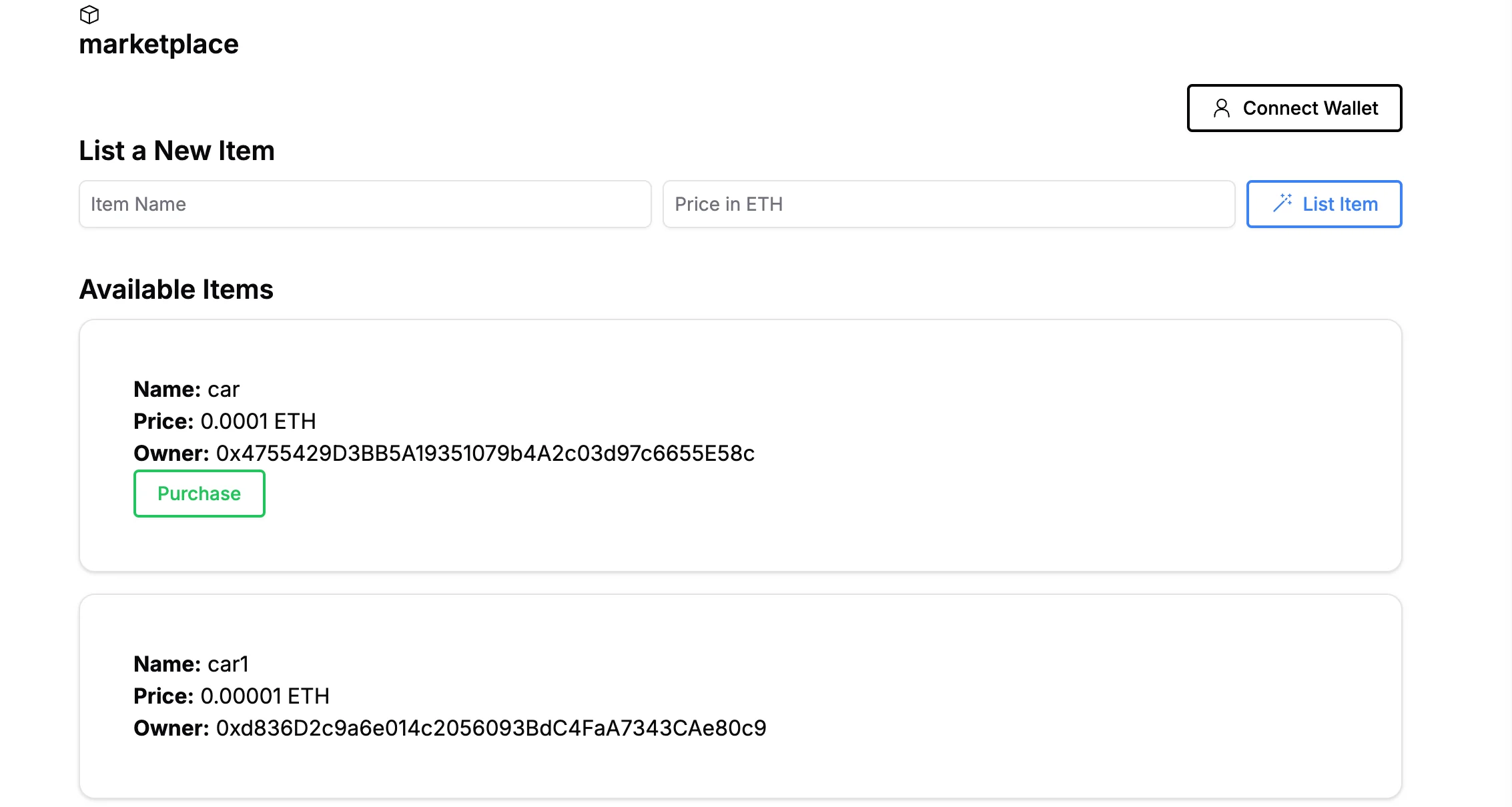
Now we should be able to list and item, buy, and transfer ownership. See the built live website here.
In this guide, we built a simple decentralized marketplace dapp on Linea, leveraging zkEVM technology for scalability and cost efficiency. We covered everything from setting up the environment to writing and deploying smart contracts, and integrating the frontend with Next.js and ShadcnUI.
As we continue to explore and expand on this foundational knowledge, consider the potential for further enhancements, such as integrating additional features or optimizing the user experience, bidding on items, and auctions.
Latest Articles
All articles


Meet the Linea Consortium
A fifth member joins the Linea Consortium, rounding out the group of Ethereum stewards driving both protocols forward.
January 13, 2026

2025 Launched a New Era for Linea and L2s
2025 will be remembered as the year a broken L2 paradigm began to shift to something more stable and enduring. This is the year the ecosystem grew up, and much of that foundation was laid in recent months by Linea Over the past several months with the launch of the LINEA token, Linea established itself as the most ETH-centric L2. Linea tokenomics drives a non-extractive economy, designed to benefit every participant in our network over the long term “The networks that will matter in five years aren't the ones optimizing for today's benchmarks,” explains Declan Fox, Head of Linea. “They're the ones designed to be self-sustaining economies that strengthen Ethereum, not just sit on top of it.”
December 11, 2025

Ethereum evolves, and so does Linea: Introducing the Fusaka upgrade
From Prague to Osaka: Linea proves zkEVM can keep pace with Ethereum
December 3, 2025

